
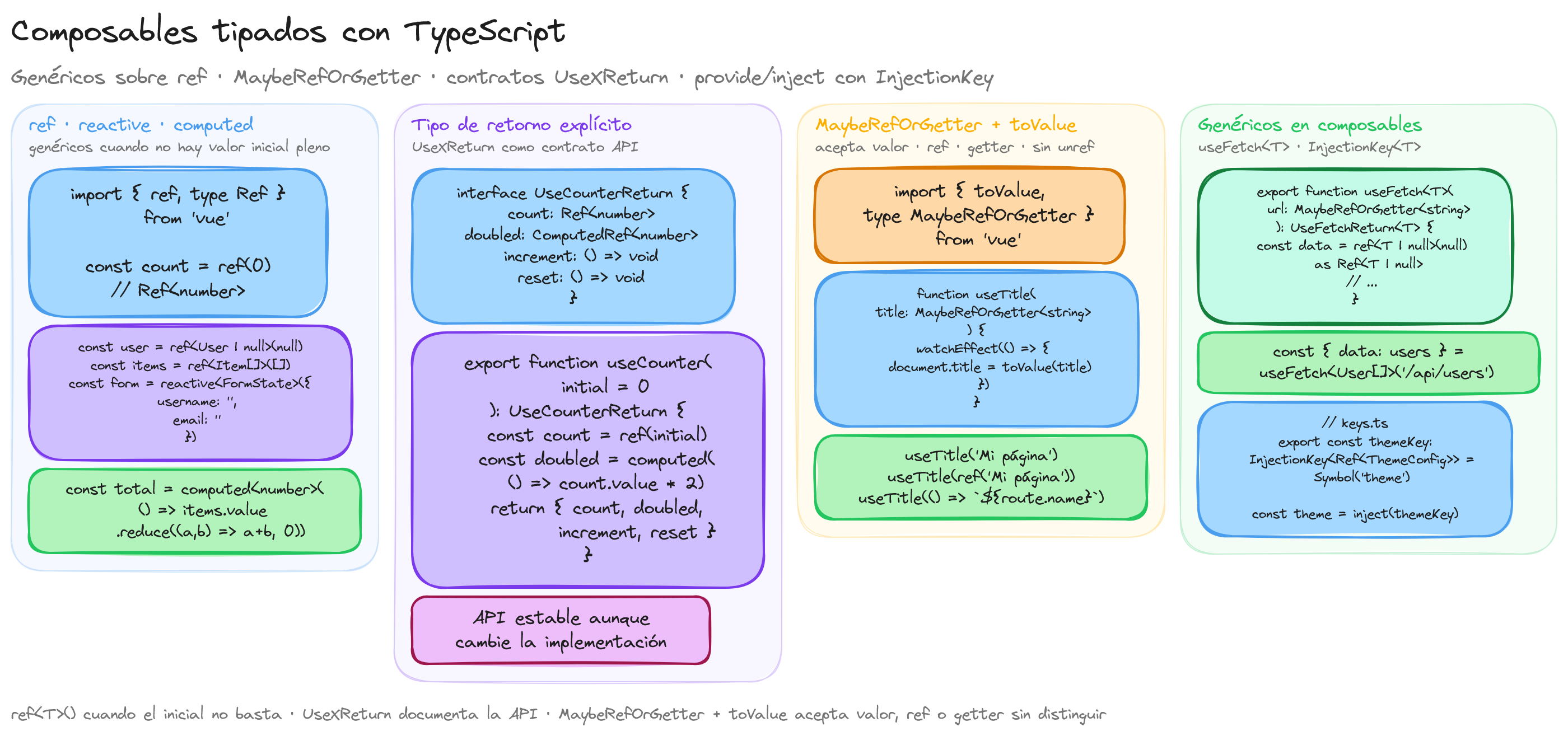
Tipado de ref, reactive y computed
Los primitivos de reactividad de Vue aceptan genéricos de TypeScript para anotar sus tipos de forma explícita. Aunque Vue infiere tipos automáticamente en la mayoría de casos, la anotación explícita es necesaria cuando el tipo inicial no representa el tipo completo.
ref con genéricos
<script setup lang="ts">
import { ref, type Ref } from 'vue'

// Tipo inferido: Ref<number>
const count = ref(0)

// Tipo explícito cuando el valor inicial no basta
const user = ref<string | null>(null)

// Tipo complejo con interfaz
interface Notification {
  id: number
  message: string
  type: 'info' | 'warning' | 'error'
}

const notifications = ref<Notification[]>([])
</script>
El tipo Ref<T> se puede usar en firmas de funciones y composables para anotar parámetros y valores de retorno:
import { type Ref } from 'vue'

function useCounter(initial: number): { count: Ref<number>; increment: () => void } {
  const count = ref(initial)
  const increment = () => { count.value++ }
  return { count, increment }
}
reactive con genéricos
reactive infiere el tipo del objeto pasado, pero puede anotarse explícitamente con una interfaz:
<script setup lang="ts">
import { reactive } from 'vue'

interface FormState {
  username: string
  email: string
  age: number | null
  accepted: boolean
}

const form = reactive<FormState>({
  username: '',
  email: '',
  age: null,
  accepted: false
})
</script>
computed con genéricos
computed infiere su tipo del valor retornado por la función getter. Se puede anotar explícitamente cuando el tipo inferido no es suficientemente específico:
<script setup lang="ts">
import { ref, computed } from 'vue'

const items = ref([1, 2, 3, 4, 5])

// Inferido como ComputedRef<number>
const total = computed(() => items.value.reduce((a, b) => a + b, 0))

// Anotación explícita
const summary = computed<string>(() => `Total: ${total.value} (${items.value.length} items)`)
</script>
Composables con tipos de retorno explícitos
Un composable es una función que encapsula lógica reactiva reutilizable. Definir tipos de retorno explícitos mejora la mantenibilidad y documenta la API pública del composable:
import { ref, computed, type Ref, type ComputedRef } from 'vue'

interface UseCounterReturn {
  count: Ref<number>
  doubled: ComputedRef<number>
  increment: () => void
  decrement: () => void
  reset: () => void
}

export function useCounter(initialValue: number = 0): UseCounterReturn {
  const count = ref(initialValue)

  const doubled = computed(() => count.value * 2)

  function increment() {
    count.value++
  }

  function decrement() {
    count.value--
  }

  function reset() {
    count.value = initialValue
  }

  return { count, doubled, increment, decrement, reset }
}
Definir una interfaz para el retorno tiene ventajas claras:
- El editor muestra documentación precisa al usar el composable
- Si se cambia la implementación interna, el tipo de retorno garantiza que la API pública no se rompa
- Facilita escribir tests con tipos exactos
MaybeRef y MaybeRefOrGetter
Vue proporciona tipos de utilidad para crear composables que aceptan argumentos tanto reactivos como no reactivos, maximizando la flexibilidad:
MaybeRef<T>: AceptaToRef<T>MaybeRefOrGetter<T>: AceptaT,Ref<T>o() => T
Estos tipos permiten que un composable funcione correctamente sin importar cómo el consumidor pase los datos:
import { computed, toValue, type MaybeRefOrGetter } from 'vue'

export function useFormattedPrice(price: MaybeRefOrGetter<number>, currency: MaybeRefOrGetter<string> = 'EUR') {
  const formatted = computed(() => {
    const p = toValue(price)
    const c = toValue(currency)
    return new Intl.NumberFormat('es-ES', {
      style: 'currency',
      currency: c
    }).format(p)
  })

  return { formatted }
}
toValue para unwrapping
toValue() es la función complementaria que extrae el valor independientemente del formato de entrada:
- Si recibe un
Ref, retorna.value - Si recibe una función getter, la ejecuta y retorna el resultado
- Si recibe un valor plano, lo retorna tal cual
import { ref, toValue, type MaybeRefOrGetter } from 'vue'

function useTitle(title: MaybeRefOrGetter<string>) {
  watchEffect(() => {
    document.title = toValue(title)
  })
}

// Todas estas llamadas son válidas:
useTitle('Mi página')
useTitle(ref('Mi página'))
useTitle(() => `Página ${route.name}`)
Esto es preferible a unref(), que solo maneja Ref pero no funciones getter.
Genéricos en composables
Los composables genéricos aceptan tipos como parámetros, permitiendo reutilizar la misma lógica con diferentes estructuras de datos.
useFetch genérico
import { ref, watchEffect, toValue, type Ref, type MaybeRefOrGetter } from 'vue'

interface UseFetchReturn<T> {
  data: Ref<T | null>
  error: Ref<string | null>
  isLoading: Ref<boolean>
}

export function useFetch<T>(url: MaybeRefOrGetter<string>): UseFetchReturn<T> {
  const data = ref<T | null>(null) as Ref<T | null>
  const error = ref<string | null>(null)
  const isLoading = ref(false)

  watchEffect(async () => {
    const resolvedUrl = toValue(url)
    if (!resolvedUrl) return

    isLoading.value = true
    error.value = null

    try {
      const response = await fetch(resolvedUrl)
      if (!response.ok) {
        throw new Error(`HTTP ${response.status}: ${response.statusText}`)
      }
      data.value = await response.json() as T
    } catch (e) {
      error.value = e instanceof Error ? e.message : 'Error desconocido'
      data.value = null
    } finally {
      isLoading.value = false
    }
  })

  return { data, error, isLoading }
}
Uso del composable con tipo explícito:
<script setup lang="ts">
import { useFetch } from '@/composables/useFetch'

interface User {
  id: number
  name: string
  email: string
}

const { data: users, error, isLoading } = useFetch<User[]>('/api/users')
</script>

<template>
  <div v-if="isLoading">Cargando...</div>
  <div v-else-if="error">Error: {{ error }}</div>
  <ul v-else-if="users">
    <li v-for="user in users" :key="user.id">
      {{ user.name }} - {{ user.email }}
    </li>
  </ul>
</template>
useLocalStorage genérico
import { ref, watch, type Ref } from 'vue'

export function useLocalStorage<T>(key: string, defaultValue: T): Ref<T> {
  const stored = localStorage.getItem(key)
  const data = ref<T>(stored ? JSON.parse(stored) : defaultValue) as Ref<T>

  watch(
    data,
    (newValue) => {
      if (newValue === null || newValue === undefined) {
        localStorage.removeItem(key)
      } else {
        localStorage.setItem(key, JSON.stringify(newValue))
      }
    },
    { deep: true }
  )

  return data
}
Uso:
<script setup lang="ts">
import { useLocalStorage } from '@/composables/useLocalStorage'

interface UserPreferences {
  theme: 'light' | 'dark'
  language: string
  fontSize: number
}

const preferences = useLocalStorage<UserPreferences>('user-prefs', {
  theme: 'light',
  language: 'es',
  fontSize: 16
})
</script>
useDebounce genérico
import { ref, watch, type Ref, type MaybeRefOrGetter, toValue } from 'vue'

export function useDebounce<T>(source: MaybeRefOrGetter<T>, delay: number = 300): Ref<T> {
  const debounced = ref<T>(toValue(source)) as Ref<T>
  let timeout: ReturnType<typeof setTimeout>

  watch(
    () => toValue(source),
    (newValue) => {
      clearTimeout(timeout)
      timeout = setTimeout(() => {
        debounced.value = newValue
      }, delay)
    }
  )

  return debounced
}
Uso:
<script setup lang="ts">
import { ref } from 'vue'
import { useDebounce } from '@/composables/useDebounce'
import { useFetch } from '@/composables/useFetch'

const searchQuery = ref('')
const debouncedQuery = useDebounce(searchQuery, 500)

interface SearchResult {
  id: number
  title: string
}

const { data: results } = useFetch<SearchResult[]>(
  () => `/api/search?q=${debouncedQuery.value}`
)
</script>

<template>
  <input v-model="searchQuery" placeholder="Buscar..." />
  <ul v-if="results">
    <li v-for="result in results" :key="result.id">{{ result.title }}</li>
  </ul>
</template>
Tipado de provide/inject con InjectionKey
provide e inject transmiten datos entre componentes sin pasar por props. Con TypeScript, se usa InjectionKey<T> para garantizar la seguridad de tipos:
// src/keys.ts
import type { InjectionKey, Ref } from 'vue'

export interface ThemeConfig {
  primary: string
  secondary: string
  dark: boolean
}

export const themeKey: InjectionKey<Ref<ThemeConfig>> = Symbol('theme')
export const loggerKey: InjectionKey<(msg: string) => void> = Symbol('logger')
El proveedor usa la clave tipada:
<!-- App.vue -->
<script setup lang="ts">
import { ref, provide } from 'vue'
import { themeKey, loggerKey, type ThemeConfig } from '@/keys'

const theme = ref<ThemeConfig>({
  primary: '#3498db',
  secondary: '#2ecc71',
  dark: false
})

provide(themeKey, theme)
provide(loggerKey, (msg: string) => console.log(`[App] ${msg}`))
</script>
El consumidor inyecta con la misma clave y obtiene el tipo correcto:
<!-- DeepChild.vue -->
<script setup lang="ts">
import { inject } from 'vue'
import { themeKey, loggerKey } from '@/keys'

const theme = inject(themeKey)
// Tipo: Ref<ThemeConfig> | undefined

const logger = inject(loggerKey, (msg: string) => console.warn(msg))
// Tipo: (msg: string) => void — el valor por defecto elimina undefined
</script>

<template>
  <div :style="{ color: theme?.primary }">
    Componente con tema inyectado
  </div>
</template>
El segundo argumento de inject es un valor por defecto. Cuando se proporciona, TypeScript elimina undefined del tipo resultante, evitando comprobaciones de null innecesarias.
Ejemplo práctico: composable completo tipado
A continuación, un composable completo que combina genéricos, MaybeRefOrGetter, InjectionKey y tipos de retorno explícitos:
// src/composables/usePagination.ts
import { ref, computed, toValue, type Ref, type ComputedRef, type MaybeRefOrGetter } from 'vue'

interface UsePaginationReturn<T> {
  currentPage: Ref<number>
  pageSize: Ref<number>
  totalPages: ComputedRef<number>
  paginatedItems: ComputedRef<T[]>
  nextPage: () => void
  prevPage: () => void
  goToPage: (page: number) => void
}

export function usePagination<T>(
  items: MaybeRefOrGetter<T[]>,
  initialPageSize: number = 10
): UsePaginationReturn<T> {
  const currentPage = ref(1)
  const pageSize = ref(initialPageSize)

  const totalPages = computed(() =>
    Math.ceil(toValue(items).length / pageSize.value)
  )

  const paginatedItems = computed<T[]>(() => {
    const all = toValue(items)
    const start = (currentPage.value - 1) * pageSize.value
    return all.slice(start, start + pageSize.value)
  })

  function nextPage() {
    if (currentPage.value < totalPages.value) {
      currentPage.value++
    }
  }

  function prevPage() {
    if (currentPage.value > 1) {
      currentPage.value--
    }
  }

  function goToPage(page: number) {
    if (page >= 1 && page <= totalPages.value) {
      currentPage.value = page
    }
  }

  return {
    currentPage,
    pageSize,
    totalPages,
    paginatedItems,
    nextPage,
    prevPage,
    goToPage
  }
}
Uso en un componente:
<script setup lang="ts">
import { ref } from 'vue'
import { usePagination } from '@/composables/usePagination'

interface Product {
  id: number
  name: string
  price: number
}

const allProducts = ref<Product[]>([
  { id: 1, name: 'Producto A', price: 10 },
  { id: 2, name: 'Producto B', price: 20 },
  // ... más productos
])

const {
  currentPage,
  totalPages,
  paginatedItems,
  nextPage,
  prevPage,
  goToPage
} = usePagination<Product>(allProducts, 5)
</script>

<template>
  <ul>
    <li v-for="product in paginatedItems" :key="product.id">
      {{ product.name }} - {{ product.price }} €
    </li>
  </ul>
  <div>
    <button :disabled="currentPage === 1" @click="prevPage">Anterior</button>
    <span>Página {{ currentPage }} de {{ totalPages }}</span>
    <button :disabled="currentPage === totalPages" @click="nextPage">Siguiente</button>
  </div>
</template>
Este ejemplo demuestra cómo un composable genérico tipado con MaybeRefOrGetter acepta tanto datos reactivos como estáticos, y cómo el tipo de retorno explícito documenta su API completa.

Alan Sastre
Ingeniero de Software y formador, CEO en CertiDevs
Ingeniero de software especializado en Full Stack y en Inteligencia Artificial. Como CEO de CertiDevs, Vuejs es una de sus áreas de expertise. Con más de 15 años programando, 6K seguidores en LinkedIn y experiencia como formador, Alan se dedica a crear contenido educativo de calidad para desarrolladores de todos los niveles.
Más tutoriales de Vuejs
Explora más contenido relacionado con Vuejs y continúa aprendiendo con nuestros tutoriales gratuitos.
Aprendizajes de esta lección
- Comprender tipado de ref, reactive y computed
- Aplicar composables con tipos de retorno explícitos
- Identificar maybeRef y MaybeRefOrGetter
- Implementar genéricos en composables