
Testing de stores Pinia
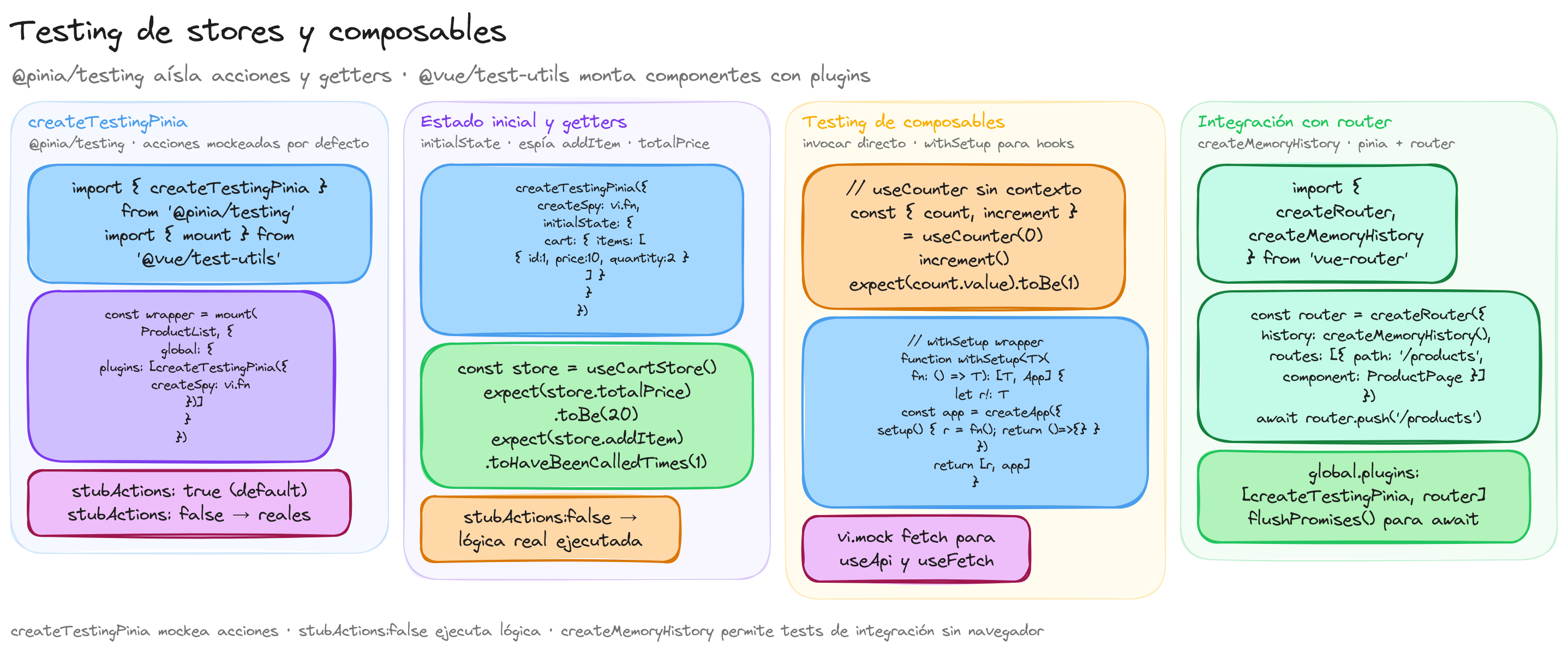
Pinia proporciona el paquete @pinia/testing con utilidades específicas para facilitar el testing de stores. La herramienta principal es createTestingPinia, que crea una instancia de Pinia configurada para tests.
Instalación
npm install -D @pinia/testing
Configuración básica con createTestingPinia
createTestingPinia crea una instancia de Pinia donde, por defecto, todas las acciones se reemplazan por mocks (vi.fn()). Esto permite verificar que las acciones se llaman correctamente sin ejecutar su lógica real:
import { describe, it, expect, vi } from 'vitest'
import { mount } from '@vue/test-utils'
import { createTestingPinia } from '@pinia/testing'
import ProductList from './ProductList.vue'
import { useProductStore } from '@/stores/product'

describe('ProductList', () => {
  it('monta el componente con un store de testing', () => {
    const wrapper = mount(ProductList, {
      global: {
        plugins: [
          createTestingPinia({
            createSpy: vi.fn,
          })
        ],
      },
    })

    const store = useProductStore()
    // Las acciones son mocks por defecto
    expect(store.fetchProducts).toHaveBeenCalledTimes(0)
  })
})
Establecer estado inicial
createTestingPinia acepta un initialState que permite definir el estado con el que arranca cada store durante el test:
const wrapper = mount(ProductList, {
  global: {
    plugins: [
      createTestingPinia({
        createSpy: vi.fn,
        initialState: {
          product: {
            items: [
              { id: 1, name: 'Laptop', price: 999 },
              { id: 2, name: 'Monitor', price: 350 },
            ],
            loading: false,
          },
        },
      }),
    ],
  },
})

const store = useProductStore()
expect(store.items).toHaveLength(2)
expect(store.items[0].name).toBe('Laptop')
La clave del objeto initialState debe coincidir con el id del store definido en defineStore.
Control de acciones con stubActions
stubActions decide si las acciones del store son sustitutos vacíos para aserciones o si se ejecuta la implementación real:
Por defecto, stubActions es true, lo que reemplaza todas las acciones por mocks vacíos. Si se necesita ejecutar la lógica real de las acciones, se puede desactivar:
// Acciones mockeadas (por defecto)
createTestingPinia({
  createSpy: vi.fn,
  stubActions: true,
})

// Acciones reales
createTestingPinia({
  createSpy: vi.fn,
  stubActions: false,
})
Espiar y verificar llamadas a acciones
Cuando las acciones estan mockeadas, se puede verificar que se llaman con los argumentos correctos:
describe('CartPage', () => {
  it('llama a addItem al hacer click en el boton', async () => {
    const wrapper = mount(CartPage, {
      global: {
        plugins: [createTestingPinia({ createSpy: vi.fn })],
      },
    })

    const store = useCartStore()

    await wrapper.find('[data-testid="add-btn"]').trigger('click')

    expect(store.addItem).toHaveBeenCalledTimes(1)
    expect(store.addItem).toHaveBeenCalledWith({
      id: 1,
      name: 'Producto',
      price: 29.99,
    })
  })
})
Testing de getters
Los getters se prueban estableciendo el estado y verificando los valores computados:
// stores/cart.ts
export const useCartStore = defineStore('cart', () => {
  const items = ref<CartItem[]>([])

  const totalPrice = computed(() =>
    items.value.reduce((sum, item) => sum + item.price * item.quantity, 0)
  )

  const itemCount = computed(() =>
    items.value.reduce((sum, item) => sum + item.quantity, 0)
  )

  function addItem(product: Product) {
    const existing = items.value.find(i => i.id === product.id)
    if (existing) {
      existing.quantity++
    } else {
      items.value.push({ ...product, quantity: 1 })
    }
  }

  return { items, totalPrice, itemCount, addItem }
})
describe('useCartStore getters', () => {
  it('calcula el precio total correctamente', () => {
    const pinia = createTestingPinia({
      createSpy: vi.fn,
      initialState: {
        cart: {
          items: [
            { id: 1, name: 'A', price: 10, quantity: 2 },
            { id: 2, name: 'B', price: 25, quantity: 1 },
          ],
        },
      },
    })

    const store = useCartStore(pinia)
    expect(store.totalPrice).toBe(45)
  })

  it('cuenta el total de items', () => {
    const pinia = createTestingPinia({
      createSpy: vi.fn,
      initialState: {
        cart: {
          items: [
            { id: 1, name: 'A', price: 10, quantity: 2 },
            { id: 2, name: 'B', price: 25, quantity: 3 },
          ],
        },
      },
    })

    const store = useCartStore(pinia)
    expect(store.itemCount).toBe(5)
  })
})
Testing de acciones con lógica real
Si se necesita probar la lógica de las acciones, se desactiva stubActions:
describe('useCartStore acciones', () => {
  it('anade un nuevo item al carrito', () => {
    const pinia = createTestingPinia({
      createSpy: vi.fn,
      stubActions: false,
    })

    const store = useCartStore(pinia)
    expect(store.items).toHaveLength(0)

    store.addItem({ id: 1, name: 'Laptop', price: 999 })

    expect(store.items).toHaveLength(1)
    expect(store.items[0].quantity).toBe(1)
  })

  it('incrementa la cantidad si el item ya existe', () => {
    const pinia = createTestingPinia({
      createSpy: vi.fn,
      stubActions: false,
    })

    const store = useCartStore(pinia)
    store.addItem({ id: 1, name: 'Laptop', price: 999 })
    store.addItem({ id: 1, name: 'Laptop', price: 999 })

    expect(store.items).toHaveLength(1)
    expect(store.items[0].quantity).toBe(2)
  })
})
Testing de composables
Los composables son funciones que encapsulan lógica reactiva. Su testing depende de si necesitan un contexto de componente Vue o no.
Composables simples (sin contexto de componente)
Los composables que solo usan ref, reactive, computed y watch se pueden testear invocandolos directamente:
// composables/useCounter.ts
import { ref, computed } from 'vue'

export function useCounter(initial = 0) {
  const count = ref(initial)
  const isPositive = computed(() => count.value > 0)

  function increment() {
    count.value++
  }

  function decrement() {
    count.value--
  }

  function reset() {
    count.value = initial
  }

  return { count, isPositive, increment, decrement, reset }
}
import { describe, it, expect } from 'vitest'
import { useCounter } from './useCounter'

describe('useCounter', () => {
  it('inicia con el valor por defecto 0', () => {
    const { count } = useCounter()
    expect(count.value).toBe(0)
  })

  it('inicia con el valor proporcionado', () => {
    const { count } = useCounter(10)
    expect(count.value).toBe(10)
  })

  it('incrementa el contador', () => {
    const { count, increment } = useCounter()
    increment()
    expect(count.value).toBe(1)
  })

  it('decrementa el contador', () => {
    const { count, decrement } = useCounter(5)
    decrement()
    expect(count.value).toBe(4)
  })

  it('detecta si el valor es positivo', () => {
    const { isPositive, increment } = useCounter(0)
    expect(isPositive.value).toBe(false)
    increment()
    expect(isPositive.value).toBe(true)
  })

  it('resetea al valor inicial', () => {
    const { count, increment, reset } = useCounter(3)
    increment()
    increment()
    expect(count.value).toBe(5)
    reset()
    expect(count.value).toBe(3)
  })
})
Composables que necesitan contexto de componente
Algunos composables usan hooks del ciclo de vida (onMounted, onUnmounted) o inyecciones (inject). Estos requieren ejecutarse dentro de un componente Vue. Se puede crear un componente wrapper auxiliar:
// test-utils/withSetup.ts
import { createApp, type App } from 'vue'

export function withSetup<T>(composable: () => T): [T, App] {
  let result!: T

  const app = createApp({
    setup() {
      result = composable()
      return () => {}
    },
  })

  app.mount(document.createElement('div'))
  return [result, app]
}
// composables/useWindowSize.ts
import { ref, onMounted, onUnmounted } from 'vue'

export function useWindowSize() {
  const width = ref(window.innerWidth)
  const height = ref(window.innerHeight)

  function update() {
    width.value = window.innerWidth
    height.value = window.innerHeight
  }

  onMounted(() => {
    window.addEventListener('resize', update)
  })

  onUnmounted(() => {
    window.removeEventListener('resize', update)
  })

  return { width, height }
}
import { describe, it, expect } from 'vitest'
import { withSetup } from '../test-utils/withSetup'
import { useWindowSize } from './useWindowSize'

describe('useWindowSize', () => {
  it('devuelve las dimensiones actuales de la ventana', () => {
    const [result, app] = withSetup(() => useWindowSize())

    expect(result.width.value).toBe(window.innerWidth)
    expect(result.height.value).toBe(window.innerHeight)

    app.unmount()
  })
})
Otra alternativa es montar un componente mínimo con mount:
import { mount } from '@vue/test-utils'
import { defineComponent } from 'vue'
import { useWindowSize } from './useWindowSize'

it('funciona dentro de un componente montado', () => {
  let resultado: ReturnType<typeof useWindowSize>

  const TestComponent = defineComponent({
    setup() {
      resultado = useWindowSize()
      return () => null
    },
  })

  const wrapper = mount(TestComponent)
  expect(resultado!.width.value).toBeGreaterThan(0)

  wrapper.unmount()
})
Mocking de dependencias externas en composables
Cuando un composable depende de módulos externos como fetch o librerias de terceros, se mockean con vi.mock:
// composables/useApi.ts
import { ref } from 'vue'

export function useApi<T>(url: string) {
  const data = ref<T | null>(null)
  const error = ref<string | null>(null)
  const loading = ref(false)

  async function execute() {
    loading.value = true
    error.value = null
    try {
      const response = await fetch(url)
      if (!response.ok) throw new Error(`HTTP ${response.status}`)
      data.value = await response.json()
    } catch (e) {
      error.value = (e as Error).message
    } finally {
      loading.value = false
    }
  }

  return { data, error, loading, execute }
}
import { describe, it, expect, vi, beforeEach } from 'vitest'
import { useApi } from './useApi'

describe('useApi', () => {
  beforeEach(() => {
    vi.restoreAllMocks()
  })

  it('carga datos correctamente', async () => {
    const mockData = { id: 1, name: 'Test' }
    global.fetch = vi.fn(() =>
      Promise.resolve({
        ok: true,
        json: () => Promise.resolve(mockData),
      } as Response)
    )

    const { data, loading, error, execute } = useApi('/api/test')

    expect(loading.value).toBe(false)
    await execute()

    expect(data.value).toEqual(mockData)
    expect(error.value).toBeNull()
    expect(loading.value).toBe(false)
  })

  it('maneja errores HTTP', async () => {
    global.fetch = vi.fn(() =>
      Promise.resolve({
        ok: false,
        status: 404,
      } as Response)
    )

    const { data, error, execute } = useApi('/api/not-found')
    await execute()

    expect(data.value).toBeNull()
    expect(error.value).toBe('HTTP 404')
  })

  it('maneja errores de red', async () => {
    global.fetch = vi.fn(() => Promise.reject(new Error('Network error')))

    const { error, execute } = useApi('/api/test')
    await execute()

    expect(error.value).toBe('Network error')
  })
})
Testing de integración: componentes + stores + router
Para tests de integración que combinan componentes con stores Pinia y Vue Router, se configuran todas las dependencias:
Configuración del router para tests
import { createRouter, createMemoryHistory } from 'vue-router'

function createTestRouter(routes = []) {
  return createRouter({
    history: createMemoryHistory(),
    routes: routes.length > 0 ? routes : [
      { path: '/', component: { template: '<div>Home</div>' } },
      { path: '/products', component: { template: '<div>Products</div>' } },
      { path: '/products/:id', component: { template: '<div>Product Detail</div>' } },
    ],
  })
}
Test de integración completo
<!-- ProductPage.vue -->
<script setup lang="ts">
import { onMounted } from 'vue'
import { useProductStore } from '@/stores/product'
import { useRouter } from 'vue-router'

const store = useProductStore()
const router = useRouter()

onMounted(() => {
  store.fetchProducts()
})

function goToDetail(id: number) {
  router.push(`/products/${id}`)
}
</script>

<template>
  <div>
    <h1>Productos</h1>
    <div v-if="store.loading" data-testid="loading">Cargando...</div>
    <ul v-else>
      <li
        v-for="product in store.items"
        :key="product.id"
        data-testid="product-item"
        @click="goToDetail(product.id)"
      >
        {{ product.name }} - {{ product.price }} EUR
      </li>
    </ul>
  </div>
</template>
import { describe, it, expect, vi } from 'vitest'
import { mount, flushPromises } from '@vue/test-utils'
import { createTestingPinia } from '@pinia/testing'
import { createRouter, createMemoryHistory } from 'vue-router'
import ProductPage from './ProductPage.vue'
import { useProductStore } from '@/stores/product'

function createTestRouter() {
  return createRouter({
    history: createMemoryHistory(),
    routes: [
      { path: '/', component: { template: '<div />' } },
      { path: '/products', component: ProductPage },
      { path: '/products/:id', component: { template: '<div>Detail</div>' } },
    ],
  })
}

describe('ProductPage integracion', () => {
  it('renderiza los productos del store', async () => {
    const router = createTestRouter()
    await router.push('/products')
    await router.isReady()

    const wrapper = mount(ProductPage, {
      global: {
        plugins: [
          createTestingPinia({
            createSpy: vi.fn,
            initialState: {
              product: {
                items: [
                  { id: 1, name: 'Vue Book', price: 35 },
                  { id: 2, name: 'TS Guide', price: 28 },
                ],
                loading: false,
              },
            },
          }),
          router,
        ],
      },
    })

    const items = wrapper.findAll('[data-testid="product-item"]')
    expect(items).toHaveLength(2)
    expect(items[0].text()).toContain('Vue Book')
  })

  it('llama a fetchProducts al montarse', async () => {
    const router = createTestRouter()
    await router.push('/products')
    await router.isReady()

    mount(ProductPage, {
      global: {
        plugins: [
          createTestingPinia({ createSpy: vi.fn }),
          router,
        ],
      },
    })

    const store = useProductStore()
    expect(store.fetchProducts).toHaveBeenCalledTimes(1)
  })

  it('navega al detalle al hacer click en un producto', async () => {
    const router = createTestRouter()
    await router.push('/products')
    await router.isReady()

    const wrapper = mount(ProductPage, {
      global: {
        plugins: [
          createTestingPinia({
            createSpy: vi.fn,
            initialState: {
              product: {
                items: [{ id: 5, name: 'Producto Test', price: 50 }],
                loading: false,
              },
            },
          }),
          router,
        ],
      },
    })

    await wrapper.find('[data-testid="product-item"]').trigger('click')
    await flushPromises()

    expect(router.currentRoute.value.path).toBe('/products/5')
  })
})
Esta combinación de createTestingPinia para los stores y createRouter con createMemoryHistory para el router permite ejecutar tests de integración sin depender del navegador ni de APIs externas.

Alan Sastre
Ingeniero de Software y formador, CEO en CertiDevs
Ingeniero de software especializado en Full Stack y en Inteligencia Artificial. Como CEO de CertiDevs, Vuejs es una de sus áreas de expertise. Con más de 15 años programando, 6K seguidores en LinkedIn y experiencia como formador, Alan se dedica a crear contenido educativo de calidad para desarrolladores de todos los niveles.
Más tutoriales de Vuejs
Explora más contenido relacionado con Vuejs y continúa aprendiendo con nuestros tutoriales gratuitos.
Aprendizajes de esta lección
- Comprender testing de stores Pinia
- Aplicar testing de composables
- Identificar testing de integración: componentes + stores + router