
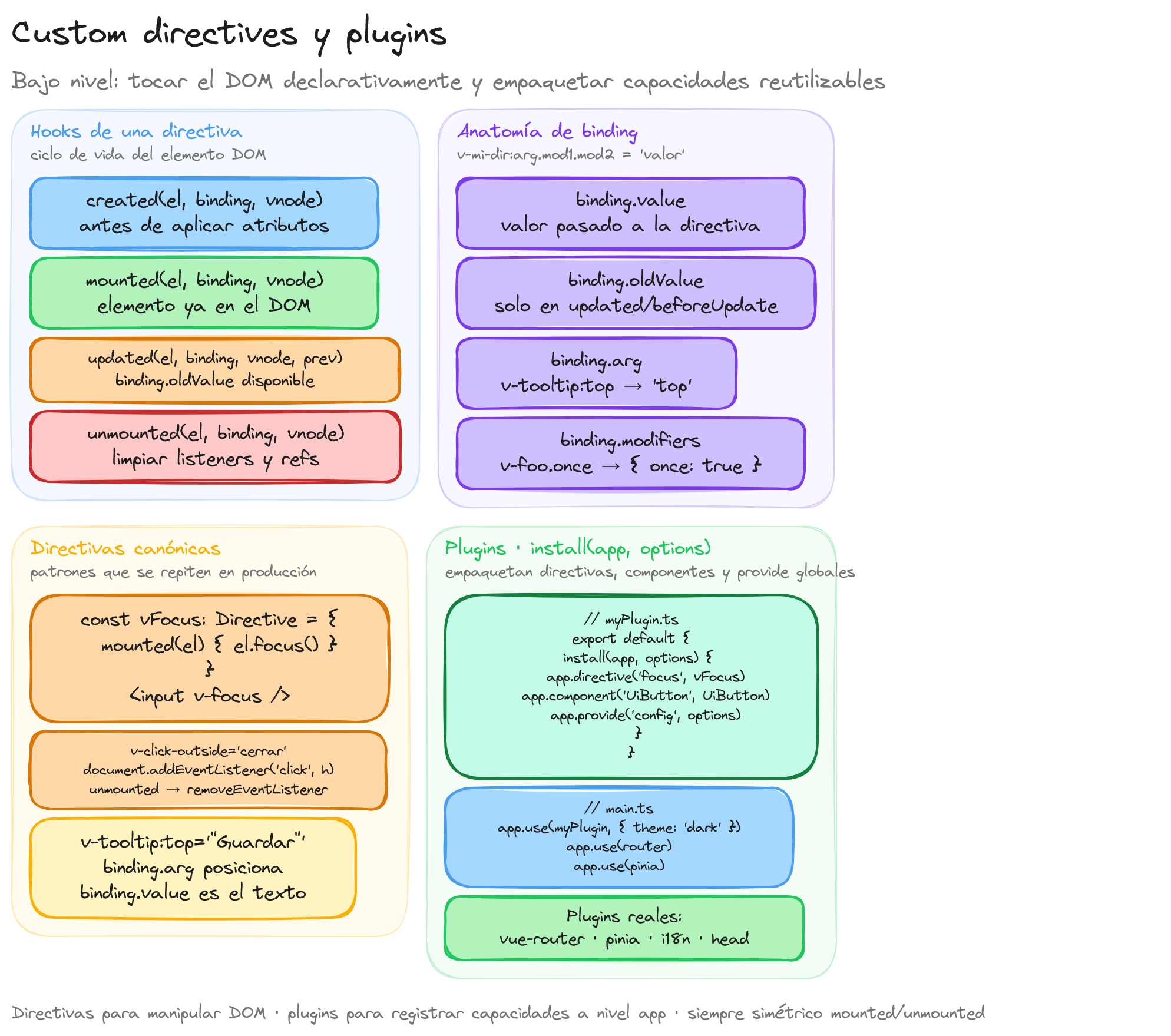
Directivas personalizadas
Las directivas personalizadas en Vue permiten acceder directamente al DOM y manipularlo de forma declarativa. Se utilizan cuando se necesita un comportamiento DOM de bajo nivel que no se puede lograr fácilmente con templates o componentes.
Los casos de uso típicos incluyen:
- Dar foco automático a un input
- Detectar clics fuera de un elemento
- Mostrar tooltips
- Observar la visibilidad de un elemento
- Controlar permisos de visualización
Hooks de una directiva
Una directiva personalizada puede definir los siguientes hooks, que se corresponden con el ciclo de vida del elemento al que se aplica:
Orden habitual de los hooks en el ciclo de vida del elemento DOM:
import type { Directive } from 'vue'

const miDirectiva: Directive = {
  // Llamado cuando los atributos del elemento se aplican, antes de montar
  created(el, binding, vnode) {},

  // Justo antes de insertar el elemento en el DOM
  beforeMount(el, binding, vnode) {},

  // Después de que el elemento y sus hijos se montan en el DOM
  mounted(el, binding, vnode) {},

  // Antes de actualizar el componente padre
  beforeUpdate(el, binding, vnode, prevVnode) {},

  // Después de actualizar el componente padre y todos sus hijos
  updated(el, binding, vnode, prevVnode) {},

  // Antes de desmontar el elemento
  beforeUnmount(el, binding, vnode) {},

  // Despues de desmontar el elemento
  unmounted(el, binding, vnode) {},
}
El objeto binding contiene información sobre cómo se usó la directiva:
binding.value: el valor pasado a la directiva (v-my-dir="valor")binding.oldValue: el valor anterior (solo disponible enbeforeUpdateyupdated)binding.arg: el argumento de la directiva (v-my-dir:arg)binding.modifiers: objeto con los modificadores (v-my-dir.mod->{ mod: true })
Sintaxis abreviada
Si solo se necesita el mismo comportamiento en mounted y updated, se puede usar una función directamente:
const vColor: Directive = (el, binding) => {
  el.style.color = binding.value
}
Ejemplo: v-focus
Directiva que da el foco automáticamente a un elemento al montarse:
// directives/vFocus.ts
import type { Directive } from 'vue'

const vFocus: Directive = {
  mounted(el: HTMLElement) {
    el.focus()
  },
}

export default vFocus
Uso en un componente con <script setup>:
<script setup lang="ts">
import vFocus from '@/directives/vFocus'
</script>

<template>
  <input v-focus type="text" placeholder="Foco automático" />
</template>
Ejemplo: v-click-outside
Directiva que ejecuta un callback cuando el usuario hace click fuera del elemento:
// directives/vClickOutside.ts
import type { Directive } from 'vue'

interface ClickOutsideElement extends HTMLElement {
  _clickOutsideHandler?: (event: MouseEvent) => void
}

const vClickOutside: Directive<ClickOutsideElement, () => void> = {
  mounted(el, binding) {
    el._clickOutsideHandler = (event: MouseEvent) => {
      const target = event.target as Node
      if (!el.contains(target)) {
        binding.value()
      }
    }
    document.addEventListener('click', el._clickOutsideHandler)
  },

  unmounted(el) {
    if (el._clickOutsideHandler) {
      document.removeEventListener('click', el._clickOutsideHandler)
    }
  },
}

export default vClickOutside
<script setup lang="ts">
import { ref } from 'vue'
import vClickOutside from '@/directives/vClickOutside'

const isOpen = ref(false)

function closeDropdown() {
  isOpen.value = false
}
</script>

<template>
  <div v-click-outside="closeDropdown" class="dropdown">
    <button @click="isOpen = !isOpen">Menu</button>
    <ul v-if="isOpen" class="dropdown__list">
      <li>Opcion 1</li>
      <li>Opcion 2</li>
      <li>Opcion 3</li>
    </ul>
  </div>
</template>
Ejemplo: v-tooltip
Directiva con argumento para posicionar un tooltip:
// directives/vTooltip.ts
import type { Directive } from 'vue'

const vTooltip: Directive<HTMLElement, string> = {
  mounted(el, binding) {
    const tooltip = document.createElement('div')
    tooltip.className = 'tooltip'
    tooltip.textContent = binding.value
    tooltip.style.position = 'absolute'
    tooltip.style.display = 'none'

    const position = binding.arg || 'top'
    el.style.position = 'relative'
    el.appendChild(tooltip)

    el.addEventListener('mouseenter', () => {
      tooltip.style.display = 'block'
      if (position === 'top') {
        tooltip.style.bottom = '100%'
        tooltip.style.left = '50%'
        tooltip.style.transform = 'translateX(-50%)'
      } else if (position === 'bottom') {
        tooltip.style.top = '100%'
        tooltip.style.left = '50%'
        tooltip.style.transform = 'translateX(-50%)'
      }
    })

    el.addEventListener('mouseleave', () => {
      tooltip.style.display = 'none'
    })
  },

  updated(el, binding) {
    const tooltip = el.querySelector('.tooltip')
    if (tooltip) {
      tooltip.textContent = binding.value
    }
  },
}

export default vTooltip
<template>
  <button v-tooltip:top="'Guardar cambios'">Guardar</button>
  <button v-tooltip:bottom="'Eliminar elemento'">Eliminar</button>
</template>
Ejemplo: v-permission
Directiva con modificadores para controlar visibilidad según permisos:
// directives/vPermission.ts
import type { Directive } from 'vue'

const vPermission: Directive<HTMLElement, string[]> = {
  mounted(el, binding) {
    const userPermissions = ['read', 'write'] // Obtener del store o contexto

    const requiredPermissions = binding.value
    const requireAll = binding.modifiers.all

    let hasPermission: boolean
    if (requireAll) {
      hasPermission = requiredPermissions.every(p => userPermissions.includes(p))
    } else {
      hasPermission = requiredPermissions.some(p => userPermissions.includes(p))
    }

    if (!hasPermission) {
      el.style.display = 'none'
    }
  },
}

export default vPermission
<template>
  <!-- Visible si el usuario tiene al menos uno de los permisos -->
  <button v-permission="['write', 'admin']">Editar</button>

  <!-- Visible solo si el usuario tiene TODOS los permisos -->
  <button v-permission.all="['admin', 'delete']">Eliminar</button>
</template>
Registro global de directivas
Las directivas se pueden registrar globalmente en main.ts:
import { createApp } from 'vue'
import App from './App.vue'
import vFocus from './directives/vFocus'
import vClickOutside from './directives/vClickOutside'
import vTooltip from './directives/vTooltip'

const app = createApp(App)

app.directive('focus', vFocus)
app.directive('click-outside', vClickOutside)
app.directive('tooltip', vTooltip)

app.mount('#app')
Plugins
Un plugin en Vue es un objeto con un método install que recibe la instancia de la aplicación y, opcionalmente, opciones de configuración. Los plugins permiten añadir funcionalidades globales de forma encapsulada.
Estructura de un plugin
import type { App } from 'vue'

interface MiPluginOptions {
  apiUrl: string
  debug?: boolean
}

const miPlugin = {
  install(app: App, options: MiPluginOptions) {
    // Registrar directivas globales
    // Registrar componentes globales
    // Proveer valores con provide/inject
    // Añadir propiedades globales
    // Configurar manejadores de errores
  },
}

export default miPlugin
Creación de un plugin completo
Un plugin de notificaciones que registra un composable global, una directiva y configura propiedades:
// plugins/notifications.ts
import type { App, InjectionKey, Ref } from 'vue'
import { ref } from 'vue'

export interface Notification {
  id: number
  message: string
  type: 'success' | 'error' | 'info'
}

export interface NotificationService {
  notifications: Ref<Notification[]>
  notify: (message: string, type?: Notification['type']) => void
  dismiss: (id: number) => void
}

export const NotificationKey: InjectionKey<NotificationService> = Symbol('notifications')

interface NotificationPluginOptions {
  maxNotifications?: number
  duration?: number
}

export default {
  install(app: App, options: NotificationPluginOptions = {}) {
    const maxNotifications = options.maxNotifications ?? 5
    const duration = options.duration ?? 3000
    let nextId = 0

    const notifications = ref<Notification[]>([])

    function notify(message: string, type: Notification['type'] = 'info') {
      const id = nextId++
      notifications.value.push({ id, message, type })

      if (notifications.value.length > maxNotifications) {
        notifications.value.shift()
      }

      setTimeout(() => dismiss(id), duration)
    }

    function dismiss(id: number) {
      notifications.value = notifications.value.filter(n => n.id !== id)
    }

    const service: NotificationService = { notifications, notify, dismiss }

    // Proveer el servicio para inject
    app.provide(NotificationKey, service)

    // Añadir propiedad global accesible en plantillas
    app.config.globalProperties.$notify = notify
  },
}
Uso del plugin
Registro en main.ts:
import { createApp } from 'vue'
import App from './App.vue'
import notificationsPlugin from './plugins/notifications'

const app = createApp(App)

app.use(notificationsPlugin, {
  maxNotifications: 3,
  duration: 5000,
})

app.mount('#app')
Consumo en un componente con inject:
<script setup lang="ts">
import { inject } from 'vue'
import { NotificationKey, type NotificationService } from '@/plugins/notifications'

const { notifications, notify, dismiss } = inject(NotificationKey) as NotificationService

function handleSave() {
  notify('Guardado correctamente', 'success')
}

function handleError() {
  notify('Ha ocurrido un error', 'error')
}
</script>

<template>
  <div>
    <button @click="handleSave">Guardar</button>
    <button @click="handleError">Simular error</button>

    <div class="notifications">
      <div
        v-for="notification in notifications"
        :key="notification.id"
        :class="['notification', `notification--${notification.type}`]"
      >
        {{ notification.message }}
        <button @click="dismiss(notification.id)">x</button>
      </div>
    </div>
  </div>
</template>
Manejador global de errores
Vue permite configurar un manejador de errores global a través de app.config.errorHandler:
// plugins/errorHandler.ts
import type { App } from 'vue'

export default {
  install(app: App) {
    app.config.errorHandler = (err, instance, info) => {
      console.error('[Vue Error]', err)
      console.error('Componente:', instance?.$options?.name || 'desconocido')
      console.error('Info:', info)

      // Enviar a servicio de tracking
      // errorTrackingService.capture(err, { component: info })
    }
  },
}
Propiedades globales
app.config.globalProperties permite añadir propiedades accesibles en todos los templates. Es útil para helpers de formato o configuración:
// plugins/globals.ts
import type { App } from 'vue'

export default {
  install(app: App) {
    app.config.globalProperties.$formatPrice = (price: number): string => {
      return new Intl.NumberFormat('es-ES', {
        style: 'currency',
        currency: 'EUR',
      }).format(price)
    }

    app.config.globalProperties.$appName = 'Mi Aplicacion'
  },
}
<template>
  <p>Precio: {{ $formatPrice(29.99) }}</p>
  <footer>{{ $appName }}</footer>
</template>
Para tipar estas propiedades en TypeScript, se extiende la interfaz ComponentCustomProperties:
// types/global.d.ts
declare module 'vue' {
  interface ComponentCustomProperties {
    $formatPrice: (price: number) => string
    $appName: string
    $notify: (message: string, type?: string) => void
  }
}

Alan Sastre
Ingeniero de Software y formador, CEO en CertiDevs
Ingeniero de software especializado en Full Stack y en Inteligencia Artificial. Como CEO de CertiDevs, Vuejs es una de sus áreas de expertise. Con más de 15 años programando, 6K seguidores en LinkedIn y experiencia como formador, Alan se dedica a crear contenido educativo de calidad para desarrolladores de todos los niveles.
Más tutoriales de Vuejs
Explora más contenido relacionado con Vuejs y continúa aprendiendo con nuestros tutoriales gratuitos.
Aprendizajes de esta lección
- Comprender directivas personalizadas
- Aplicar plugins